Output Devices in a Tesla Car You Need to Know About
Output devices in a Tesla car include the central touchscreen, driver display, audio speakers, and ambient lighting. These devices work together to create a seamless, tech-forward driving experience. Understanding them helps Tesla owners get the most from their vehicle.
Key Takeaways
- Tesla’s Central Touchscreen: The 15- or 17-inch display is the brain of the car, controlling almost everything from navigation to climate.
- Driver Instrument Cluster: The digital display behind the steering wheel shows speed, battery level, and driving mode in real time.
- Audio and Sound System: Tesla’s premium audio output delivers immersive sound through multiple speakers built into the cabin.
- Ambient Lighting: LED mood lighting is an output device that enhances the cabin feel and provides subtle driver feedback.
- Autopilot Visual Alerts: Output devices also include visual and audio warnings for safety features like Autopilot and collision alerts.
- OTA Updates: Tesla can push software updates that change how output devices behave, adding new features over time.
- Mobile App Integration: The Tesla app acts as an external output device, letting you monitor and control your car remotely.
📑 Table of Contents
- What Are Output Devices in a Tesla Car?
- The Tesla Touchscreen: The Heart of the Car
- The Driver Display: Your Digital Instrument Cluster
- Audio Output: Tesla’s Sound System
- Ambient Lighting: The Subtle Output Device
- Safety and Alert Output Devices
- How Tesla Output Devices Work Together
- Comparing Tesla Output Devices to Traditional Cars
- The Future of Output Devices in Tesla Cars
- Final Thoughts
What Are Output Devices in a Tesla Car?
When you think about a Tesla, what comes to mind first? For most people, it is the giant screen. The output devices in a Tesla car are the parts that show you information, play sound, and give you feedback while you drive. Unlike a traditional car with basic gauges and speakers, a Tesla packs a lot of technology into its cabin.
These output devices include screens, speakers, lights, and even your phone. Each one plays a role in making the driving experience smooth and intuitive. In this article, we will break down every major output device you will find in a Tesla. You will learn how they work, why they matter, and what makes them different from other cars.
Whether you already own a Tesla or are thinking about buying one, understanding these devices helps you appreciate the engineering behind the brand. So let us dive in and explore the tech inside your Tesla.
Why Output Devices Matter in a Tesla
Tesla cars are known for their minimal interior design. There are almost no physical buttons. Instead, the Tesla touchscreen and other digital displays handle most tasks. This design choice makes the cabin feel clean and modern. But it also means the output devices carry a huge load.
In a traditional car, you have separate devices for different jobs. The speedometer shows your speed. The radio plays music. The check engine light warns you of problems. In a Tesla, many of these functions share one or two screens. The Tesla infotainment system pulls all of this together into one seamless experience.
This integration is what sets Tesla apart. The output devices are not just screens and speakers. They are the main way you interact with your car every day.
The Tesla Touchscreen: The Heart of the Car
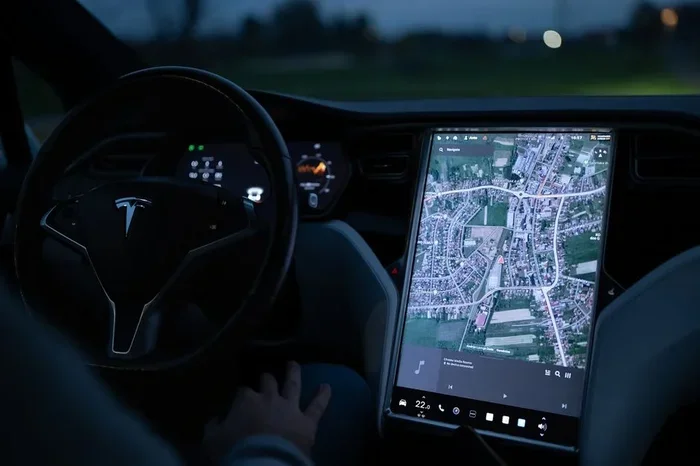
The most famous output device in any Tesla is the central touchscreen. Depending on the model, this screen measures either 15 or 17 inches diagonally. It sits in the center of the dashboard and controls almost everything in the car.
You use the Tesla touchscreen to adjust climate control, change music, set navigation, and even control the car’s driving modes. It is essentially the command center for your vehicle. Tesla calls it the “infotainment console,” but really, it is much more than that.
Here is what the touchscreen handles on a daily basis:
- Navigation: Maps, route planning, and real-time traffic updates all appear here.
- Climate Control: You can adjust the temperature for the driver, passenger, and rear seats.
- Media: Streaming services, radio, Bluetooth, and media apps run through the screen.
- Vehicle Settings: Charging preferences, autopilot settings, and safety features are all accessible here.
- Camera Feeds: The surround-view cameras display live footage when you need it.
What Makes the Tesla Screen Different
Most car screens are small and limited in function. The Tesla screen is closer to a tablet computer. It runs on a custom version of Linux and has a powerful processor. This means it responds quickly and handles multiple tasks at once.
The screen also receives over-the-air updates. Tesla can add new features, improve performance, or fix bugs without you visiting a service center. This is a huge advantage over traditional automakers. Over time, your car gets better thanks to software updates that enhance the output experience.
One thing to keep in mind: the screen can get warm during heavy use. This is normal and part of its design. Tesla engineered the display to handle long gaming sessions, movie playback, and navigation without overheating.
The Driver Display: Your Digital Instrument Cluster
Behind the steering wheel, you will find another key output device. The Tesla driver display is a digital instrument cluster that replaces traditional analog gauges. It shows your current speed, battery charge level, driving mode, and navigation prompts.
Unlike the central touchscreen, the driver display is designed to be glanceable. It gives you essential information without taking your eyes off the road for too long. Tesla places it strategically so it does not block your view of the windshield.
Here are the main things the driver display shows:
- Current Speed: Displayed in large, easy-to-read digits.
- Battery Range: Estimated miles remaining on a full charge.
- Driving Mode: Whether you are in Chill, Standard, or Sport mode.
- Navigation Arrows: Turn-by-turn directions appear right in your line of sight.
- Safety Alerts: Warnings for collision risk, lane departure, and Autopilot status.
Customizing the Driver Display
You can customize what appears on the driver display through the settings menu. Tesla offers different theme options, including a dark mode that reduces glare at night. You can also choose what data points appear most prominently.
For Tesla owners who use Autopilot, the driver display becomes even more important. It shows the status of your active safety features, lane positioning, and upcoming maneuvers. The display keeps you informed and engaged, even when the car is driving itself.
Audio Output: Tesla’s Sound System
Sound is another important output in any car. Tesla offers an impressive audio system that delivers clear, rich sound throughout the cabin. The Tesla audio system uses multiple speakers placed strategically around the interior.
Higher-end models come with a premium audio setup that includes a subwoofer and more speakers. This creates a surround-sound effect that makes music, podcasts, and calls sound fantastic. Even the base audio system in standard models is surprisingly good for a car.
You control the audio output through the touchscreen or the steering wheel controls. Tesla supports Bluetooth streaming, FM radio, and various music apps. You can also connect USB devices for lossless audio playback.
Audio Features Worth Noting
Tesla’s audio system includes some features that go beyond basic sound output:
- Immersive Sound Mode: A spatial audio setting that makes music feel like it is coming from all around you.
- Voice Commands: You can ask the car to play specific songs or artists using voice control.
- Cinema Mode Audio: When watching Netflix or YouTube, the audio system adjusts for a theater-like experience.
- Phone Call Output: Hands-free calling routes through the car speakers and microphone system.
For Tesla owners who care about audio quality, the sound system is one of the standout features. It competes with premium audio brands and often wins on clarity and bass response.
Ambient Lighting: The Subtle Output Device
Not all output devices in a Tesla car are screens or speakers. Ambient lighting is another type of output that Tesla uses to communicate with the driver and passengers. These LED lights are placed around the cabin and can change color and intensity.
The ambient lighting serves both aesthetic and functional purposes. It sets the mood inside the car, making the cabin feel luxurious and welcoming. But it also provides subtle feedback. For example, the lights may change color when you activate Autopilot or when a charging session is complete.
Here is how ambient lighting works in practice:
- Mood Lighting: Choose from a range of colors to match your preference or time of day.
- Driver Feedback: The lights can pulse gently to draw attention to alerts or notifications.
- Charging Status: The ambient lights may glow blue while the car is charging.
- Welcome Animation: When you approach the car, the lights can create a welcome sequence.
Why Ambient Lighting Is More Than Just Looks
It is easy to dismiss ambient lighting as a luxury feature. But in a Tesla, it serves a practical purpose too. The lights help reduce eye strain during night driving by providing soft, indirect illumination. They also help you notice alerts without staring at a bright screen.
Tesla continues to refine this feature with each software update. New colors, patterns, and animations are added over time, making the cabin experience feel fresh and modern.
Safety and Alert Output Devices
Safety is a top priority in every Tesla. The car uses multiple output devices to communicate warnings and alerts. These include visual cues on the screens, audio signals through the speakers, and even haptic feedback through the steering wheel.
When a potential collision is detected, the car alerts you through a combination of sound and visual warnings. The Tesla safety alert system uses the driver display and audio output to make sure you notice the danger immediately.
Here are the main safety-related output devices in a Tesla:
- Visual Alerts: Red or yellow warnings on the touchscreen and driver display.
- Audio Alerts: Beeps, chimes, and voice prompts that warn of obstacles or lane departures.
- Haptic Feedback: Vibrations in the steering wheel for lane departure warnings.
- Autopilot Indicators: Icons and animations on the driver display that show Autopilot status.
These output devices work together to create a layered safety system. No single alert is enough on its own. By using multiple output channels, Tesla ensures that drivers receive warnings in the most effective way possible.
Common Mistakes Tesla Owners Make with Output Devices
Even experienced Tesla owners can make mistakes when using the car’s output devices. Here are a few to avoid:
- Ignoring Software Updates: Updates often improve how output devices behave. Skipping them means missing out on enhancements.
- Overloading the Screen: Running too many apps at once can slow down the touchscreen. Close unused apps for best performance.
- Neglecting Audio Settings: Many owners never explore the audio customization options. Taking a few minutes to adjust settings can greatly improve sound quality.
- Disabling Alerts: Turning off safety alerts to reduce annoyance can be dangerous. Keep them enabled for your protection.
How Tesla Output Devices Work Together
One of the most impressive things about Tesla’s design is how all the output devices work in harmony. The Tesla user interface connects the touchscreen, driver display, audio system, ambient lights, and safety alerts into one unified experience.
When you navigate to a destination, the driver display shows turn-by-turn directions while the touchscreen displays the full map. The audio system provides voice guidance through the speakers. The ambient lighting subtly shifts to indicate navigation mode. It all feels seamless and natural.
This level of integration is rare in the automotive industry. Most car manufacturers treat each device as a separate system. Tesla treats them as parts of one cohesive whole. The result is an interior that feels more like a smart home on wheels than a traditional vehicle.
The Tesla vehicle interface also adapts to your driving habits over time. The car learns your preferred settings for climate, audio, and display brightness. It adjusts these automatically, so the output devices feel personalized without any effort on your part.
Quick Tips for Getting the Most from Tesla Output Devices
- Explore the Settings Menu: Spend 15 minutes going through the display settings. Adjust brightness, themes, and audio profiles to your liking.
- Use Voice Commands: Tesla’s voice control lets you interact with output devices hands-free. Say “Navigate to…” or “Play music” for quick control.
- Keep Software Updated: Regular updates bring new features and improvements to all output devices.
- Customize Ambient Lighting: Experiment with different colors and modes to find what works best for you.
- Use the Tesla App: The mobile app acts as an external output device. You can monitor your car, adjust settings, and even pre-condition the cabin from your phone.
Comparing Tesla Output Devices to Traditional Cars
To really appreciate what Tesla has built, it helps to compare it with traditional cars. Most vehicles use separate devices for different functions. A speedometer, a radio, a GPS unit, and warning lights are all independent components. They do not talk to each other well.
Tesla takes a different approach. The Tesla digital display replaces most of these separate devices. One screen handles navigation, media, vehicle settings, and safety alerts. This consolidation reduces clutter and makes the cabin feel more spacious.
Here is a quick comparison:
| Feature | Traditional Car | Tesla |
|---|---|---|
| Primary Display | Small analog gauges | 15-17 inch touchscreen |
| Navigation | Separate GPS unit or phone | Built-in on touchscreen |
| Audio System | Basic radio and speakers | Premium multi-speaker system |
| Safety Alerts | Warning lights and beeps | Multi-channel visual and audio alerts |
| Software Updates | Rare or none | Over-the-air updates regularly |
| Customization | Limited | Extensive through settings |
As you can see, Tesla’s output devices offer a level of integration and functionality that traditional cars simply cannot match. This is one of the main reasons Tesla has disrupted the automotive industry.
The Future of Output Devices in Tesla Cars
Tesla is always pushing the boundaries of what is possible in a car. The company is constantly working on new ways to improve the output experience. Future models may feature even larger or more advanced displays. Augmented reality overlays on the windshield could replace some screen-based outputs entirely.
Tesla is also investing in AI-powered interfaces that adapt to driver behavior in real time. Imagine a car that adjusts its output devices based on your mood, driving conditions, or time of day. This kind of personalization is not far off.
For now, the current lineup of output devices in a Tesla car is already among the best in the industry. The combination of a powerful touchscreen, a clear driver display, a premium audio system, and smart ambient lighting creates an interior experience that feels years ahead of the competition.
Expert Insight
According to automotive tech analysts, Tesla’s approach to output devices is a key reason the brand has built such a loyal customer base. The seamless integration of screens, sound, and lighting creates an interior that feels premium without being complicated. As one expert put it, “Tesla did not just add technology to a car. They reimagined what a car interior can be.”
Final Thoughts
The output devices in a Tesla car are more than just screens and speakers. They are the primary way you interact with your vehicle every single day. From the massive central touchscreen to the subtle ambient lighting, each device plays a vital role in creating a safe, enjoyable, and futuristic driving experience.
Tesla has set a new standard for what car interiors should look and feel like. The integration of the Tesla infotainment system, the digital driver display, the premium audio output, and the smart safety alerts all work together to create something truly special.
If you want to get the most out of your Tesla, take the time to explore and customize these output devices. Adjust the settings, try new features, and keep your software up to date. Your Tesla is a constantly evolving machine, and its output devices are at the heart of that evolution.
Understanding how these devices work also helps you troubleshoot issues and make informed decisions about your vehicle. Whether you are showing a friend the navigation system or adjusting the audio for a road trip, you now know exactly what is happening behind the scenes.
The world of Tesla car technology is exciting and always changing. The output devices are just one piece of the puzzle, but they are a piece that touches every part of your driving experience. Embrace it, explore it, and enjoy the ride.
Frequently Asked Questions
What are the main output devices in a Tesla car?
The main output devices include the central touchscreen, the driver instrument display, the audio speaker system, ambient LED lighting, and safety alert systems. These devices work together to display information, play sound, and provide feedback while you drive.
Can you customize the Tesla touchscreen display?
Yes, Tesla allows extensive customization of the touchscreen. You can adjust brightness, choose light or dark themes, rearrange app icons, and set default views for navigation and media. These settings are found in the vehicle settings menu on the screen itself.
Does Tesla update its output devices through software?
Absolutely. Tesla regularly pushes over-the-air updates that improve the functionality of all output devices. These updates can add new features, improve screen responsiveness, enhance audio quality, and refine the overall user interface.
How does the Tesla audio system compare to other car brands?
Tesla’s audio system, especially in premium models, competes with top-tier audio brands. The speakers deliver clear highs, strong mids, and deep bass. The immersive sound mode adds a spatial dimension that many competitors do not offer at the same price point.
Are the output devices in a Tesla easy to use?
Yes, Tesla designs its output devices to be intuitive and user-friendly. The touchscreen is responsive, the driver display uses clear fonts and icons, and the audio controls are accessible from the steering wheel. Most new owners feel comfortable within the first few days of driving.
What happens if the Tesla touchscreen malfunctions?
If the touchscreen becomes unresponsive, you can still drive the car using the driver display and physical controls like the steering wheel buttons. Tesla recommends restarting the screen by holding the two scroll wheels on the steering column until the display turns off and back on.
=== CONCLUSION ===
The output devices in a Tesla car represent some of the most advanced automotive technology available today. From the stunning central touchscreen to the intelligent audio system and subtle ambient lighting, every device is designed with the driver in mind. Tesla has created an interior experience that feels futuristic, intuitive, and deeply integrated.
Understanding these devices helps you appreciate what makes Tesla special. It also empowers you to use your car more effectively and enjoy all the features it has to offer. As Tesla continues to innovate, the output devices will only become more impressive. Stay curious, keep exploring, and enjoy every drive.